Fingertip integration
Define the contact pad, the maximum object impact and cable motion through every finger pose. Keep the measured load axial.
A compact compression interface for fingertip force feedback, miniature robot end effectors and instrument development. Begin with the mounting envelope, then match the force range and cable exit.
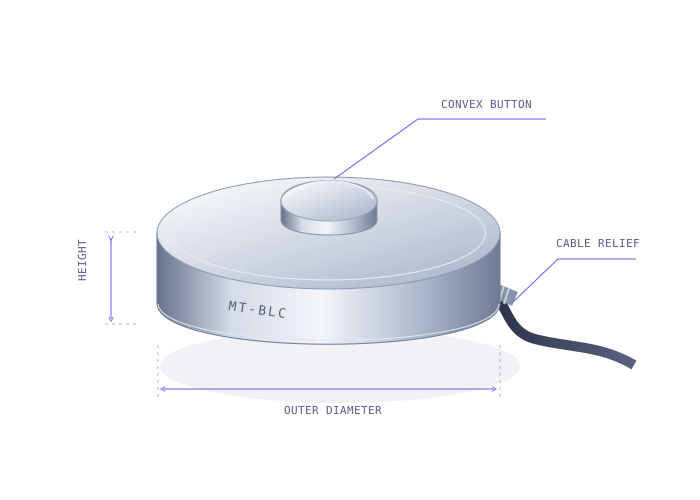
| Outer diameter (OD) | Height (H) | Series / fit | Button radius | Capacity (N / kgf / lbf) |
|---|---|---|---|---|
| Ø6 / Ø8 / Ø9.5 mm | 2.8–4 mm | MT-BLC-SUB ↗Robotics fingertips & miniature instruments | Spherical; drawing-specific | 1 N / 0.102 kgf / 0.225 lbfto 250 N / 25.493 kgf / 56.202 lbf |
Series options are not a full cross-product of every dimension and capacity. Button radius, tolerances, overload and model-specific performance are confirmed on the released drawing and quotation.
Define the contact pad, the maximum object impact and cable motion through every finger pose. Keep the measured load axial.
Choose capacity from the full load cycle, including preload and accidental contact. ADC bit depth alone does not establish usable force resolution.
Allow a separate relief channel and retain the cable jacket away from the sensor. Do not pull the fine conductors to position the button.
A compact sensor only measures correctly when the surrounding fixture supports it correctly.
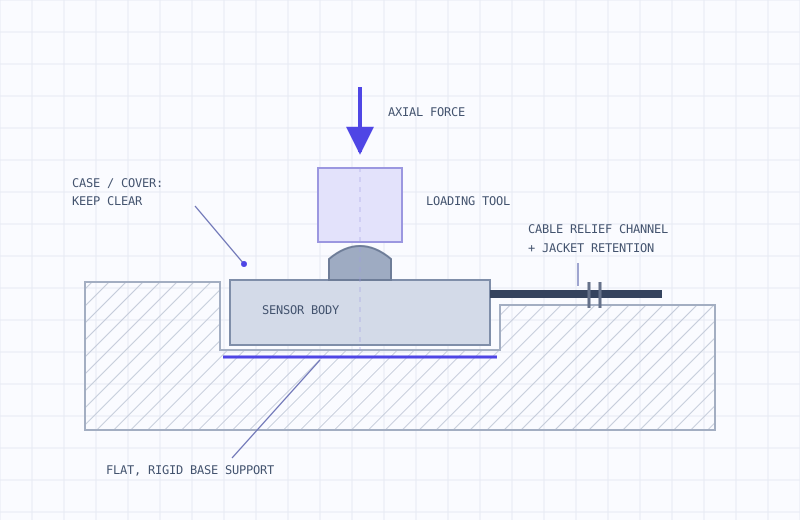
Machine a rigid, flat seat from the exact outline. Locate the sensor without squeezing the case or bypassing the sensing load path.
Align compression with the sensing axis. Keep the tool clear of the cover and outer case; a spherical top helps accommodate small alignment differences.
Provide a dedicated exit channel and jacket retention. Specify flexing, bend space and a strain-relief spring or sleeve with the configuration.
Share the maximum diameter, installed height and compression range. We’ll review the force path, propose a series and confirm the drawing and output configuration.
Prefer email? Contact sales@magatom.com. Inquiries are received by our dedicated button load cell mailbox.